One really ought to try the new app given that UIDAI has now made its Aadhaar services mobile, and how! According to a post on X (formerly Twitter), the new app should “make your Aadhaar more secure, and do more for you” in terms of storing, accessing and managing it than before. This app is available for both Android and iOS, allows to live with your Aadhaar on your phone.
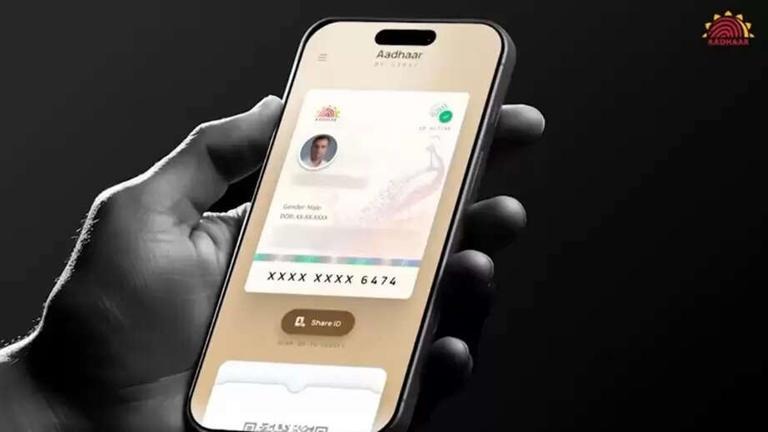
The objective of this upgrade is straightforward: enable people to carry their identity with them digitally — without having to worry about losing their card, leaving it somewhere or revealing too much information. More than just a matter of logistical convenience, the new app also offers advanced privacy controls, faster verification options and more robust security layers. Below is a simplified human interpretation of the five interesting features that you will find on the new Aadhaar app.
Aadhaar in Your Pocket—Always
No longer do you have to lug your physical Aadhaar everywhere you go. Now the new Aadhaar app keep a digital version that is well locked up inside your phone. At any bank, booking service or KYC location, you can instantly verify your identity by showing the QR code on your app. It is quick, easy and removes any risk of losing the card.
Face Authentication for Instant Verification
The most remarkable improvement is that they now support Face Authentication. Now, instead of waiting for an OTP or relying on a biometric device, you can verify your identity by scanning your face with the camera on your phone. That way, the process is much easier (including for those times when you’re waiting a while to receive OTPs or are nowhere near a fingerprint scanner). It’s of great help to senior citizens and the ones who have issues with OTP.
Share on Your Own Terms
Privacy has been a huge concern for many of the people who use Aadhaar, and the new app handles that very well. 12) Shareable Aadhaar Information: Using the updated sharing options, you can choose to share limited information to core service providers or other agencies, whenever even as an e-KYC/payments know-your-customer. For instance, if the organization only needs to confirm your identity, you can provide just your name and photo — while also hiding sensitive aspects like your date of birth or address.
This selective sharing function provides another layer of security, giving you autonomy over your personal data at all times.
Enhanced Security with Biometric Locking
The new app is serious about its security. Among other things, this has enabled the option to lock and unlock your Aadhaar biometrically, using your fingerprint data and/or facial recognition. After lock, even if someone has your phone, they cannot use you Aadhaar details.
Hence, your identity remains secured against any exploitation which is possible through an Xerox copy of your aadhaar card while you share it with someone.
keep all Aadhaar Cards of Family Members
Direct you can store your entire family Aadhaar cards in one app Some very useful addition also. Be it your parents, children, spouse etc. – you can save all Aadhaar details in one place which makes life easy for every to track all at one go. So this will make it easy to get contacts without any pain when you are on a super too while traveling, at admission or bank work and on accidents. It’s a single feature with an outsize effect on everyday convenience.
How to Set Up the New Aadhaar App
- The app installation process is pretty fast and convenient. Here’s the step-by-step process:
- Download the Aadhaar app
- First of all, go to the Google Play Store or Apple App Store and install the official Aadhaar app from UIDAI.
- Open the application and grant permissions
- Allow the necessary permission for the application to work without any glitch.
- Enter your Aadhaar number
- Enter your 12-digit Aadhaar number when asked.
- Verify your identity
- You can opt for OTP or face authentication(what you find convenient.
- Set your security PIN
- Make a PIN to keep your app safe. You will need this PIN each time you log in.
- With that done, the app should work with all its features as it were designed to be.
Final Thoughts
The new Aadhaar app is a bold move toward the digital-first identity system in India. Through face authentication, selective data sharing, biometric lock/unlock and multi-profile storage accompanying UIDAI has made handling of identity cards safer and easier.
This app is not an upgrade— it’s a smarter and more secure way to carry your Aadhaar with you anywhere in the world.
If you want the convenience, privacy and elite-level security — then, be sure to download this new Aadhaar app!

I craft sharp movie reviews and trend analysis, known for deep research, clear insights, and compelling storytelling across the latest in film and pop culture.